Performance in Context
The execution of a web browser primarily involves three tasks: fetching resources, page layout and rendering, and JavaScript execution. That said, optimizing the last two tasks won’t do much good if the browser is blocked on the network, waiting for resources to arrive.
Of the top 100K, the median page on desktop requests 97 resources weighing 2,954KB in total, and makes 16 TCP connections . While the underlying transport (TCP) is optimized for large, streaming downloads, most network transfers in the browser are short and bursty.
Even before the HTTP request itself is dispatched to the server, there is considerable overhead, e.g., DNS lookup, TCP handshake, and SSL negotiation. Assuming a 100ms roundtrip time, that’s DNS (50ms), TCP (100ms), SSL (200ms), HTTP request to server (50ms), server processing (100ms), and HTTP response from the server (50ms). The overhead before the HTTP request accounts for \(350 / 650 = 53.84 \% \) of the latency.
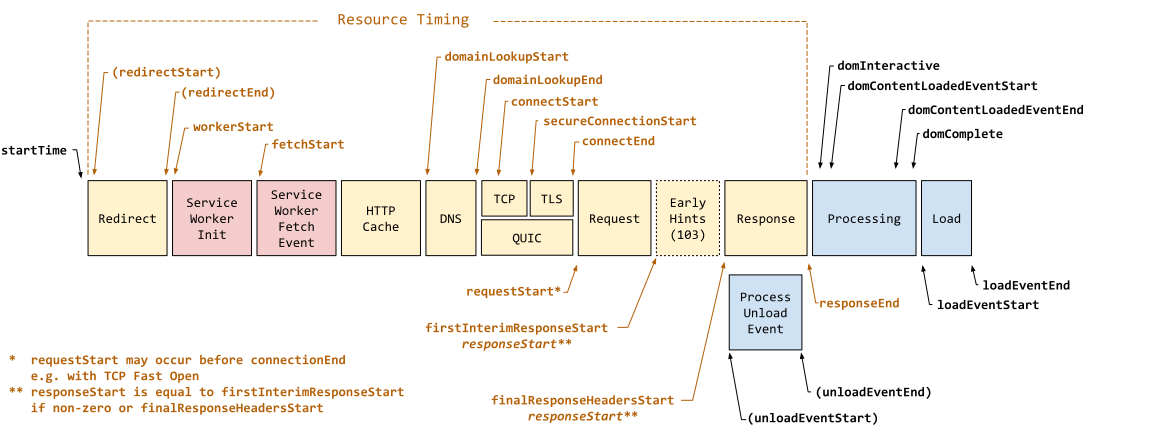
Navigation Timestamps. Source: w3c.github.io
~100ms is the limit for the user feeling that the system reacts instantaneously. ~1s is the limit for the user’s flow of thought to remain uninterrupted. ~10s is the limit for keeping the user’s attention focused on the UI. Faster sites yield more pageviews, higher engagement, and higher conversion rates, and so minimizing latency has a direct impact on the bottom line.
Before startTime
Where resources are available, Chrome aims to use a renderer process for each
site (scheme plus eTLD+1) . The
browser I/O thread listens to the named pipe from the renderer process, and
automatically forwards messages to the UI thread. A ResourceMessageFilter is
installed on this channel so that certain messages, e.g., network requests, can
be handled directly on the I/O thread. The ResourceDispatcherHost singleton in the browser process controls each
renderer’s access to the network.
Speculative Optimization with Chrome’s Predictor
There are 4 core optimization techniques:
- DNS pre-resolve: Resolve hostnames ahead of time.
- TCP pre-connect: Connect to destination server ahead of time.
- Resource prefetching: Fetch critical resources on the page ahead of time.
- Page prerendering: Fetch the entire page ahead of time, to enable instant navigation when triggered by the user.
The singleton Predictor object observes network patterns to learn and
anticipate likely user actions, e.g., user hovering over a link gives the
browser a ~200ms heads up before the user clicks. If done poorly, speculative
optimizations trigger unnecessary work and network traffic, and may impede
actual navigation triggered by the user. The Predictor adds a
ConnectInterceptor object to each request to observe traffic patterns and
record success metrics. Given a signal, Predictor’s job is to evaluate the
likelihood of its success and trigger the optimization technique(s) if resources
are available.
The HTTP Cache
Given the URL of a resource, the browser checks the HTTP cache. If the resource
exists and the appropriate cache headers, e.g., Expires, Cache-Control, were
provided, then it’s possible that the local copy is sufficient to fulfill the
request.
There are two implementations of the internal cache: one backed by local disk, and one that stores everything in memory. Incognito browsing uses the latter.
Domain Lookup
Given a hostname and a resource path, Chrome checks the ResourceDispatcherHost
singleton for pre-existing sockets, which are pooled by {scheme, host, port}.
This is also where configured proxies are consulted. If neither succeed, then a
DNS lookup (going from hostname to an IP address) is necessary.
The OS caches DNS queries, so the response might be just a system call away. If not, the time taken for the DNS lookup depends on your internet provider, presence in intermediate caches, response times for authoritative servers for that domain, etc.
DNS prefetch may be triggered by Blink providing a list of hostnames for all the
links in the current page, the render process sending a mouse-hover or
button-down event as an early signal of a likely navigation, the Omnibox
proposing a high likelihood suggestion, the Predictor going off of past
navigations, etc.
Chrome originally used the OS-provided getaddrinfo() blocking system call.
Chrome maintained a worker threadpool to allow it to perform multiple lookups in
parallel. The OS has a DNS cache to store results of getaddrinfo() for faster
future lookups.
Because getaddrinfo() hides a lot of information, Chrome implemented their own
cross-platform asynchronous DNS resolver, enabling optimizations like:
- Better control of retransmission timers
- Ability to execute multiple queries in parallel
- Visibility into record TTLs, allowing Chrome to refresh popular records ahead of time
- Better behavior for dual stack implementations (IPv4 and IPv6)
- Failovers to different servers, based on signals like RTT
Establishing the Connection
With the resolved IP address, Chrome opens a new TCP connection, a 3-way
handshake: SYN > SYN-ACK > ACK. This adds a full roundtrip of latency delay,
which depends on the chosen routing path from the client to the server.
For HTTPS destinations, an SSL handshake follows the TCP handshake. This can add up to two additional roundtrips of latency delay. If the SSL session is cached, then only one additional roundtrip is needed.
Sending the HTTP Request
HTTP requests are associated with an underlying TCP connection only once the socket is ready to dispatch the request. This allows request prioritization, e.g., arrival of a higher priority request while the socket was connecting. It also supports “warm” TCP connections, where an existing socket becomes available while a new connection is being opened.
Hints Provided by Page Authors
The page may contain <link rel="subresource" href="/javascript/myapp.js"> to
tell the browser that it may want to dispatch the request before it encounters
it later in the page.
<link rel="dns-prefetch" ...> is useful when the page author has more
information than the browser, e.g., a link that points to an analytics tracking
service which redirects the user to the actual destination.
<link rel="preconnect" ...> hints at the browser to open a connection before
waiting for the HTML parser or preload scanner to do so. Google Fonts recommends
preconnect-ing to
https://fonts.googleapis.com
and
https://fonts.gstatic.com
.
<link rel="prefetch" ...> is a hint to the browser that the resource may be
needed in a future navigation. Chrome considers this a low priority hint that is
evaluated after the current page has finished loading.
<link rel="prerender" ...> hints to Chrome that it should prerender the page
in a hidden tab. When the user triggers navigation, the tab is swapped in from
the background for an “instant experience”. Prerendering comes with many
limitations, e.g., at most 1 prerender tab across all processes, no HTTPS or
HTTP auth pages, only GET requests allowed, uses lowest CPU and network
priority, abandoned if memory requirements exceed 100MB, etc.
Optimizing the Cold-Boot Experience
Many users follow the same routine after a cold boot of the browser, e.g., navigating to our email inbox. Chrome remembers the top 10 most likely hostnames accessed by a user following browser start. As the browser loads, Chrome can trigger a DNS prefetch for likely destinations.
Optimizing Interactions with the Omnibox
Chrome records the history of user-entered prefixes, the actions it proposed, and the hit rate for each one, e.g., from chrome://predictors, whenever I enter “n” in the omnibox, I head to https://news.ycombinator.com/ \(23 / 29 \approx 83\%\) of the time. The higher the confidence, the more aggressive the speculative optimizations, e.g., DNS pre-resolve, TCP pre-connect, and so forth. An average user takes hundreds of ms to fill their query and evaluate autocomplete suggestions, and so by the time they press “Enter” much of the network latency has already been eliminated.
References
- The Performance of Open Source Software. High Performance Networking in Chrome. Ilya Grigorik. aosabook.org . Sep 26, 2013. ISBN: 9781304488787 .
- HTTP Archive: Top 1,000,000: State of the Web. httparchive.org . Accessed Jul 4, 2026.
- Response Time Limits. Jakob Nielsen. www.nngroup.com . 1993. Accessed Jul 4, 2026.
- Chromium Docs - Process Model and Site Isolation. chromium.googlesource.com . Accessed Jul 4, 2026.
- How Chromium Displays Web Pages. chromium.googlesource.com . Accessed Jul 4, 2026.
- DNS Prefetching. www.chromium.org . Accessed Jul 5, 2026.
- Assist the browser with resource hints. web.dev . Accessed Jul 5, 2026.
Choosing to roll out your own X is a fascinating decision to me. Takes some to decide that you can do better than the underlying platform. Maybe the Chrome team had a wishlist that the OS maintainers were taking too long to get to.